Daily Tasks
☑️ Check Your Email
Service Issues: Check your email for any new service issues/support questions and new leads. Respond first thing in morning.
Sales Leads: If a new lead comes in reach out to that person by phone. The goal of the phone call is to see if they have any questions or if they are interested in scheduling a demo.
What to do if you can’t reach the prospect live? Put them on the SalesPype campaign in your account called: xxxxxxx
New Order: If any new orders come in for a website or a new video please discuss with me
☑️ Check Intercom
Service Issues: Review any issues that came in over chat and submit a ticket if necessary.
Sales Leads: If a new lead comes in reach out to that person by phone. The goal of the phone call is to see if they have any questions or if they are interested in scheduling a demo.
What to do if you can’t reach the prospect live? Put them on the SalesPype campaign in your account called: xxxxxxx
☑️ Review Support Tickets
Our developers get busy and often don’t get to tickets in a timely manner. It is also common for an issue to be fixed, but our team doesn’t mark the issue as closed.
Review the status of tickets in 2 areas:
- Zendesk
- The ticketing system inside the SalesPype admin panel
Action Steps:
- Check to see if any tickets are older than 48 hours
- Reach out to Affan to get an update on these specific tickets
- Close any tickets that have been solved
☑️ Check For Billing Errors
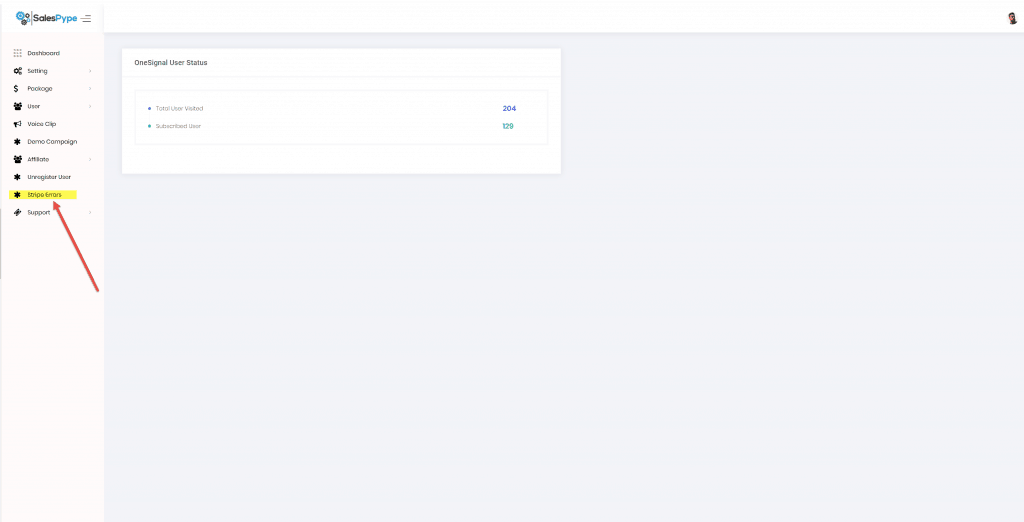
We use Stripe as our payment processing system. Sometimes people try to sign up for our service, but the payment doesn’t go through. In the admin panel there is a section on the right sidebar that says: Stripe Errors
Review this section and reach out to the client to let them know the payment didn’t go through.
☑️ Check For New Users on A Trial
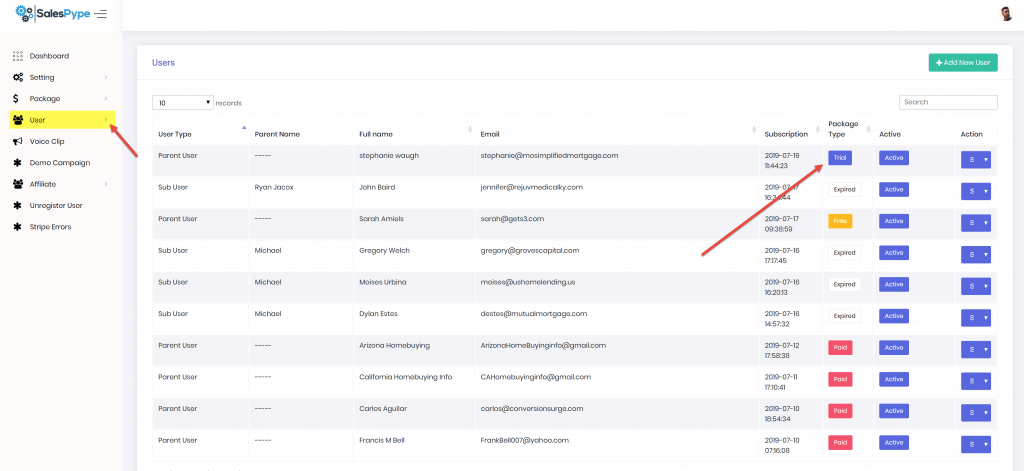
Login to the admin panel of SalesPype and check for any new users that have started a trial.
Next Steps:
1) Login to new user accounts to see if they’ve set things up or started a campaign. We want to help people get up and running quickly to avoid any frustration.
2) Add the new contact to the campaign in your SalesPype account called: Trial Users
3) Find that user in intercom and send them a message that says:
Welcome to SalesPype. We encourage you to join our Facebook group for tips and tricks to get the most out of our software. Go to: https://www.facebook.com/groups/salespypers/
☑️ Check For New Unregistered Users
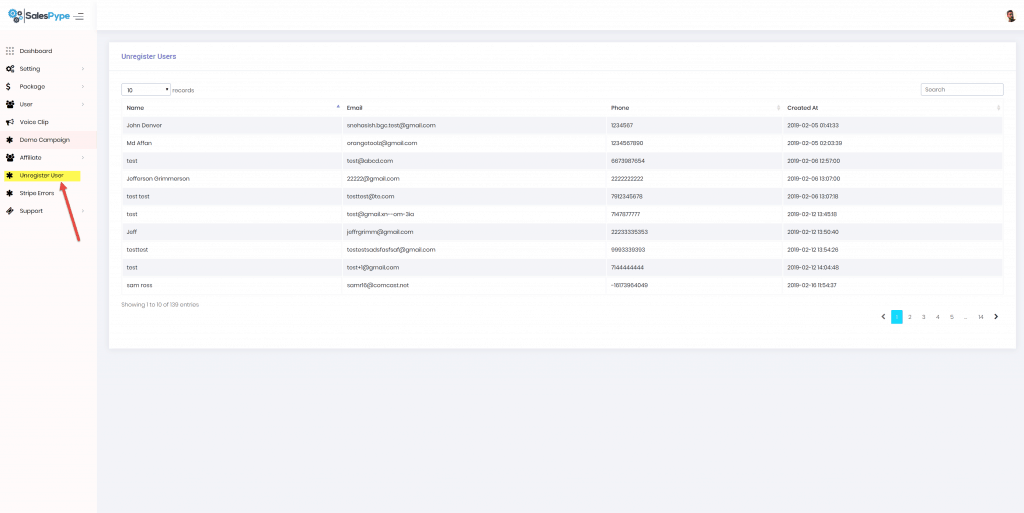
In order to start a trial of SalesPype new users have to register with their name, email, and phone. After that they are taken to a screen to input their credit card info. Some people abandon the sign up process at this stage because they don’t want to give out their credit card info. When this happens we need to reach out to these people.
Next Steps:
- Click Unregistered User in the SalesPype Dashboard
- Call all new unregistered users that came in since you yesterday
- If you are unable to reach the contact put them on the SalesPype campaign in your account called XXXXX
Monday
Complete these tasks after completing your daily tasks
☑️ Schedule social Media posts
Use Hoosuite to schedule out all of your social media posts for the week.
Schedule:
Alternate posts
- 1st post is more general and engaging
- An article about marketing from a trusted source
- 2nd post is about a new feature or a way you can use our system
Good sources for content:
- https://app.buzzsumo.com
- View competitors websites and blogs
- Hubspot
- Infusionsoft
- Active Campaign
- Skipio
- Neilpatel.com has great content
- Fre.sh
- Feedly
- Twitter Search
Content Ideas
- Facebook marketing
- Google My Business
- Lead Generation Ideas
- Sales Ideas
- YouTube Marketing
- How to follow up with sales leads
☑️ 25 New LinkedIn Connections
Send out 25 new LinkedIn connection requests today.
People to send to:
- Insurance Agents
- Loan Officers/Mortgage Brokers
- Restoration Companies
- Chiropractors
- Real Estate Agents
- Gym Owners/Yoga/Crossfit/etc.
- Recruiters
- Any new ideas you come up with for companies that could use our service
☑️ Send 25 LinkedIn Messages
Reach out to 25 contacts you haven’t previously sent a message to.
Post Ideas:
- Send them a message from The Charm Offensive template
☑️ Post to 5 LinkedIn Groups
Find dozens of groups to join on LinkedIn that are related to the industries we market to:
Industry Groups To Target:
- Insurance Agents
- Loan Officers/Mortgage Brokers
- Restoration Companies
- Chiropractors
- Real Estate Agents
- Gym Owners/Yoga/Crossfit/etc.
- Recruiters
- Any new ideas you come up with for companies that could use our service
☑️ Review Support Tickets
Our developers get busy and often don’t get to tickets in a timely manner. It is also common for an issue to be fixed, but our team doesn’t mark the issue as closed.
Review the status of tickets in 2 areas:
- Zendesk
- The ticketing system inside the SalesPype admin panel
Action Steps:
- Check to see if any tickets are older than 48 hours
- Reach out to Affan to get an update on these specific tickets
- Close any tickets that have been solved
☑️ search On Social Media
Every day you will need to conduct a search on Facebook and LinkedIn to see for posts mentioning our competitors or people looking for a service like ours. If you find a post try to find a way to mention our product and post a link. Be careful not to sound too much like a sales person.
Search terms to check:
- Skipio
- Agent Legend
- Howde
- Infusionsoft
- Active Campaign
- Salesforce
- Hubspot
- High Level
- Go High Level
- Contact Smarter
- Followup Boss
- Text Message
- Ringless Voicemail
- Automation
- CRM
- Any other competitors that pop up
☑️ Send 50 Cold Emails/Day
- Send 25 emails/day using snov.io and 25 emails using woodpecker.
Who to send emails to:
- Use my master email list in Google Drive callled: Data Purchased
- This file has been shared with you and is in your Google Drive
- Email people from LinkedIn Sales Navigator
- Scrape emails
Woodpecker Login: woodpecker.co
username: info@gets3.com
password: $2020Domination$
Tuesday
Complete these tasks after completing your daily tasks
☑️ Do A Facebook Live Post
Each Tuesday you will go live on Facebook and share a tip or strategy on how you can use our system.
Video Ideas:
- Share/Explain a feature in our system
- Share a new pre-built campaign and explain how it can be used
- Answer common questions about text message marketing, email marketing, or ringless voicemail
- Share interesting stats
☑️ 25 New LinkedIn Connections
Send out 25 new LinkedIn connection requests today.
People to send to:
- Insurance Agents
- Loan Officers/Mortgage Brokers
- Restoration Companies
- Chiropractors
- Real Estate Agents
- Gym Owners/Yoga/Crossfit/etc.
- Recruiters
- Any new ideas you come up with for companies that could use our service
☑️ Send 25 LinkedIn Messages
Send out 25 new LinkedIn connection requests today.
People to send to:
- Insurance Agents
- Loan Officers/Mortgage Brokers
- Restoration Companies
- Chiropractors
- Real Estate Agents
- Gym Owners/Yoga/Crossfit/etc.
- Recruiters
- Any new ideas you come up with for companies that could use our service
☑️ Youtube Live Stream
Each Tuesday you will go live on our Youtube channel and share a tip or strategy on how you can use our system.
***You can use the same video/video topic that you used for the Facebook Live Post
Video Ideas:
- Share/Explain a feature in our system
- Share a new pre-built campaign and explain how it can be used
- Answer common questions about text message marketing, email marketing, or ringless voicemail
- Share interesting stats
☑️ search On Social Media
Every day you will need to conduct a search on Facebook and LinkedIn to see for posts mentioning our competitors or people looking for a service like ours. If you find a post try to find a way to mention our product and post a link. Be careful not to sound too much like a sales person.
Search terms to check:
- Skipio
- Agent Legend
- Howde
- High Level
- Go High Level
- Contact Smarter
- Followup Boss
- Text Message
- Ringless Voicemail
- Automation
- CRM
☑️ Send 50 Cold Emails/Day
- Send 25 emails/day using snov.io and 25 emails using woodpecker.
Who to send emails to:
- Use my master email list in Google Drive callled: Data Purchased
- This file has been shared with you and is in your Google Drive
- Email people from LinkedIn Sales Navigator
- Scrape emails
Woodpecker Login: woodpecker.co
username: info@gets3.com
password: $2020Domination$
Wednesday
Complete these tasks after completing your daily tasks
☑️ Post to 5 LinkedIn Groups
Find dozens of groups to join on LinkedIn that are related to the industries we market to:
Industry Groups To Target:
- Insurance Agents
- Loan Officers/Mortgage Brokers
- Restoration Companies
- Chiropractors
- Real Estate Agents
- Gym Owners/Yoga/Crossfit/etc.
- Recruiters
- Any new ideas you come up with for companies that could use our service
☑️ 25 New LinkedIn Connections
Send out 25 new LinkedIn connection requests today.
People to send to:
- Insurance Agents
- Loan Officers/Mortgage Brokers
- Restoration Companies
- Chiropractors
- Real Estate Agents
- Gym Owners/Yoga/Crossfit/etc.
- Recruiters
- Any new ideas you come up with for companies that could use our service
☑️ Send 25 LinkedIn Messages
Send out 25 new LinkedIn connection requests today.
People to send to:
- Insurance Agents
- Loan Officers/Mortgage Brokers
- Restoration Companies
- Chiropractors
- Real Estate Agents
- Gym Owners/Yoga/Crossfit/etc.
- Recruiters
- Any new ideas you come up with for companies that could use our service
- * Keep everything organized in Sales Navigator
☑️ search On Social Media
Every day you will need to conduct a search on Facebook and LinkedIn to see for posts mentioning our competitors or people looking for a service like ours. If you find a post try to find a way to mention our product and post a link. Be careful not to sound too much like a sales person.
Search terms to check:
- Skipio
- Agent Legend
- Howde
- High Level
- Go High Level
- Contact Smarter
- Followup Boss
- Text Message
- Ringless Voicemail
- Automation
- CRM
☑️ Send 50 Cold Emails/Day
- Send 25 emails/day using snov.io and 25 emails using woodpecker.
Who to send emails to:
- Use my master email list in Google Drive callled: Data Purchased
- This file has been shared with you and is in your Google Drive
- Email people from LinkedIn Sales Navigator
- Scrape emails
Woodpecker Login: woodpecker.co
username: info@gets3.com
password: $2020Domination$
Thursday
Complete these tasks after completing your daily tasks
☑️ Do A Facebook Live Post
Each Tuesday you will go live on Facebook and share a tip or strategy on how you can use our system.
Video Ideas:
- Share/Explain a feature in our system
- Share a new pre-built campaign and explain how it can be used
- Answer common questions about text message marketing, email marketing, or ringless voicemail
- Share interesting stats
☑️ Youtube Live Stream
Each Tuesday you will go live on our Youtube channel and share a tip or strategy on how you can use our system.
***You can use the same video/video topic that you used for the Facebook Live Post
Video Ideas:
- Share/Explain a feature in our system
- Share a new pre-built campaign and explain how it can be used
- Answer common questions about text message marketing, email marketing, or ringless voicemail
- Share interesting stats
☑️ 25 New LinkedIn Connections
Send out 25 new LinkedIn connection requests today.
People to send to:
- Insurance Agents
- Loan Officers/Mortgage Brokers
- Restoration Companies
- Chiropractors
- Real Estate Agents
- Gym Owners/Yoga/Crossfit/etc.
- Recruiters
- Any new ideas you come up with for companies that could use our service
☑️ Search On Social Media
Every day you will need to conduct a search on Facebook and LinkedIn to see for posts mentioning our competitors or people looking for a service like ours. If you find a post try to find a way to mention our product and post a link. Be careful not to sound too much like a sales person.
Search terms to check:
- Skipio
- Agent Legend
- Howde
- High Level
- Go High Level
- Contact Smarter
- Followup Boss
- Text Message
- Ringless Voicemail
- Automation
- CRM
☑️ Send 50 Cold Emails/Day
- Send 25 emails/day using snov.io and 25 emails using woodpecker.
Who to send emails to:
- Use my master email list in Google Drive callled: Data Purchased
- This file has been shared with you and is in your Google Drive
- Email people from LinkedIn Sales Navigator
- Scrape emails
Woodpecker Login: woodpecker.co
username: info@gets3.com
password: $2020Domination$
Friday
Complete these tasks after completing your daily tasks
☑️ Make 3 New Videos
- Upload 1 Video To the SalesPype Youtube Channel
- Upload 1 Video To the Gets3 Youtube Channel
- Upload 1 Video To The Switch Insurance Channel
Video Topics:
- Use my master email list in Google Drive callled: xxxxx
- Email people from LinkedIn Sales Navigator
- Scrape emails
☑️ Run GMB Ranking Tools
- Upload 1 Video To the SalesPype Youtube Channel
- Upload 1 Video To the Gets3 Youtube Channel
- Upload 1 Video To The Switch Insurance Channel
Video Topics:
- Use my master email list in Google Drive callled: xxxxx
- Email people from LinkedIn Sales Navigator
- Scrape emails
☑️ Post To GMB Sites via Local Viking
Local Viking Login: https://localviking.com/
username: info@gets3.com
password: $2020Domination$
- SWITCH Insurance Group
- Novi Insurance Group
- Troy Insurance Group
- Livonia Insurance Group
- Royal Oak Insurance Group
- Macomb Township Insurance Group
- West Bloomfield Insurance Group
- Brighton Insurance Group
- Carmel Insurance Group
- Noblesville Insurance Group
- Westfield Insurance Group
☑️ Run A 7 Day Money Robot Campaign
How To Access Money Robot Software
Run A Google Maps Campaign In Money Robot For All Listings
We strive to make our clients happy
So, let's be happy together